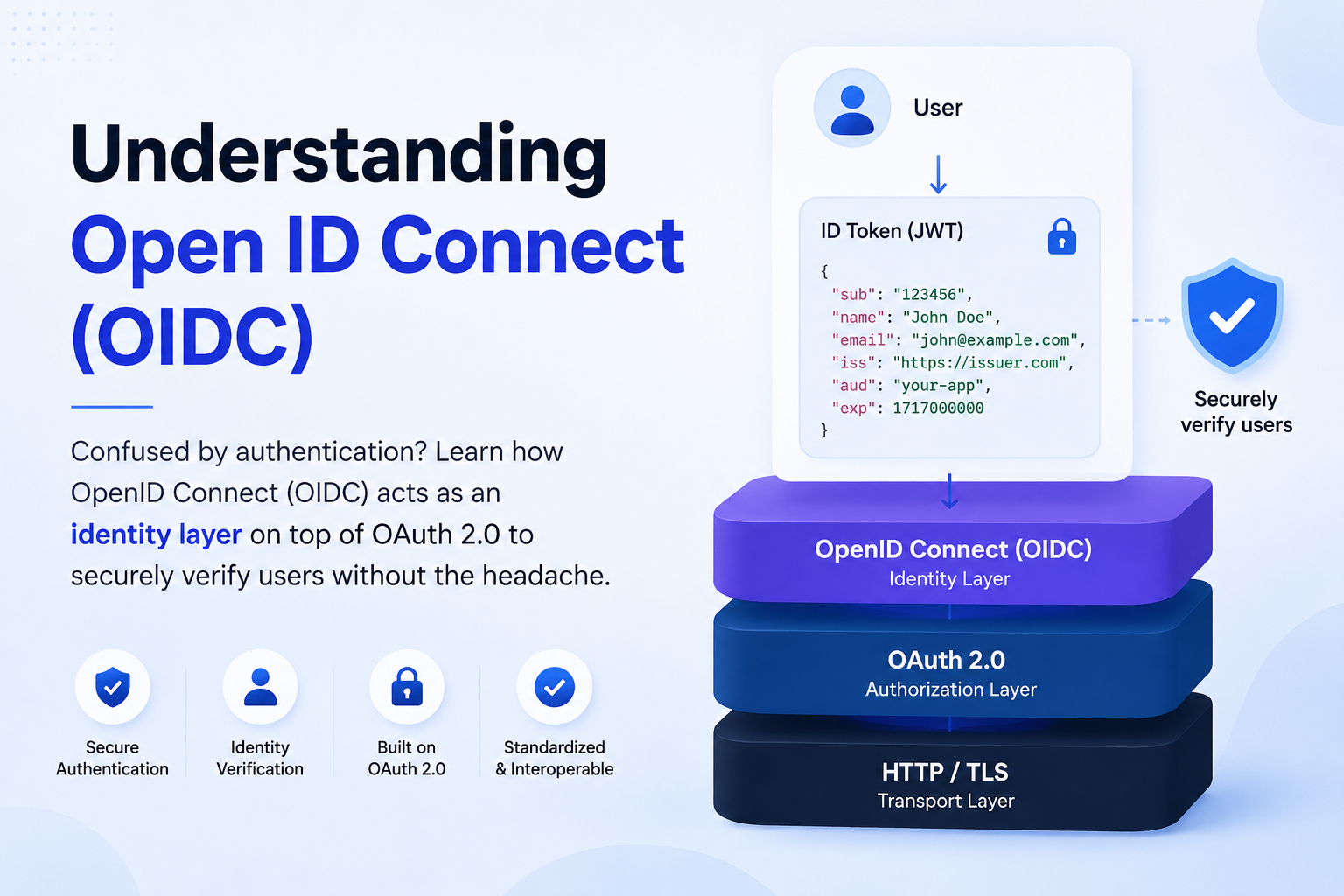
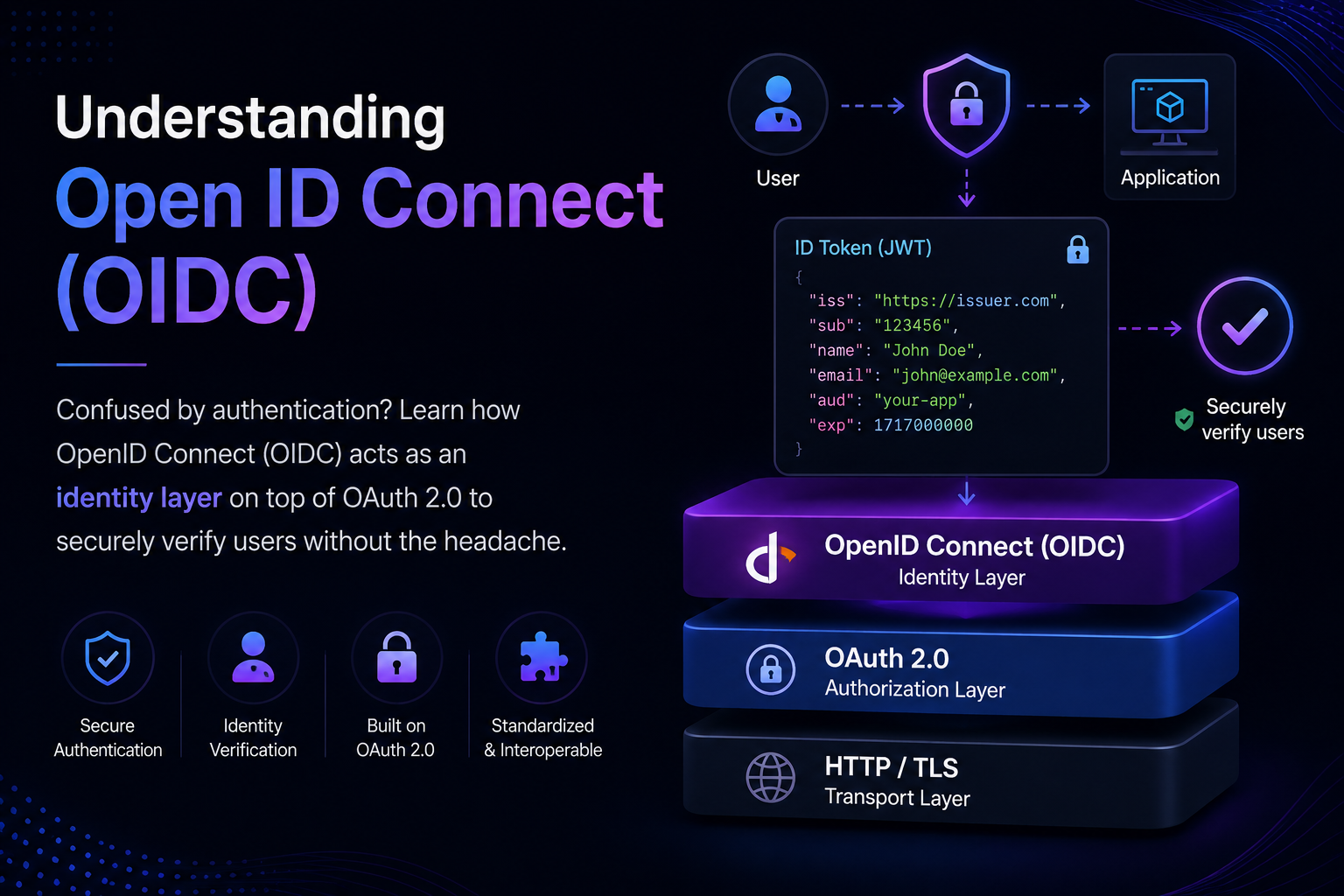
Understanding OAuth & Open ID Connect (OIDC)
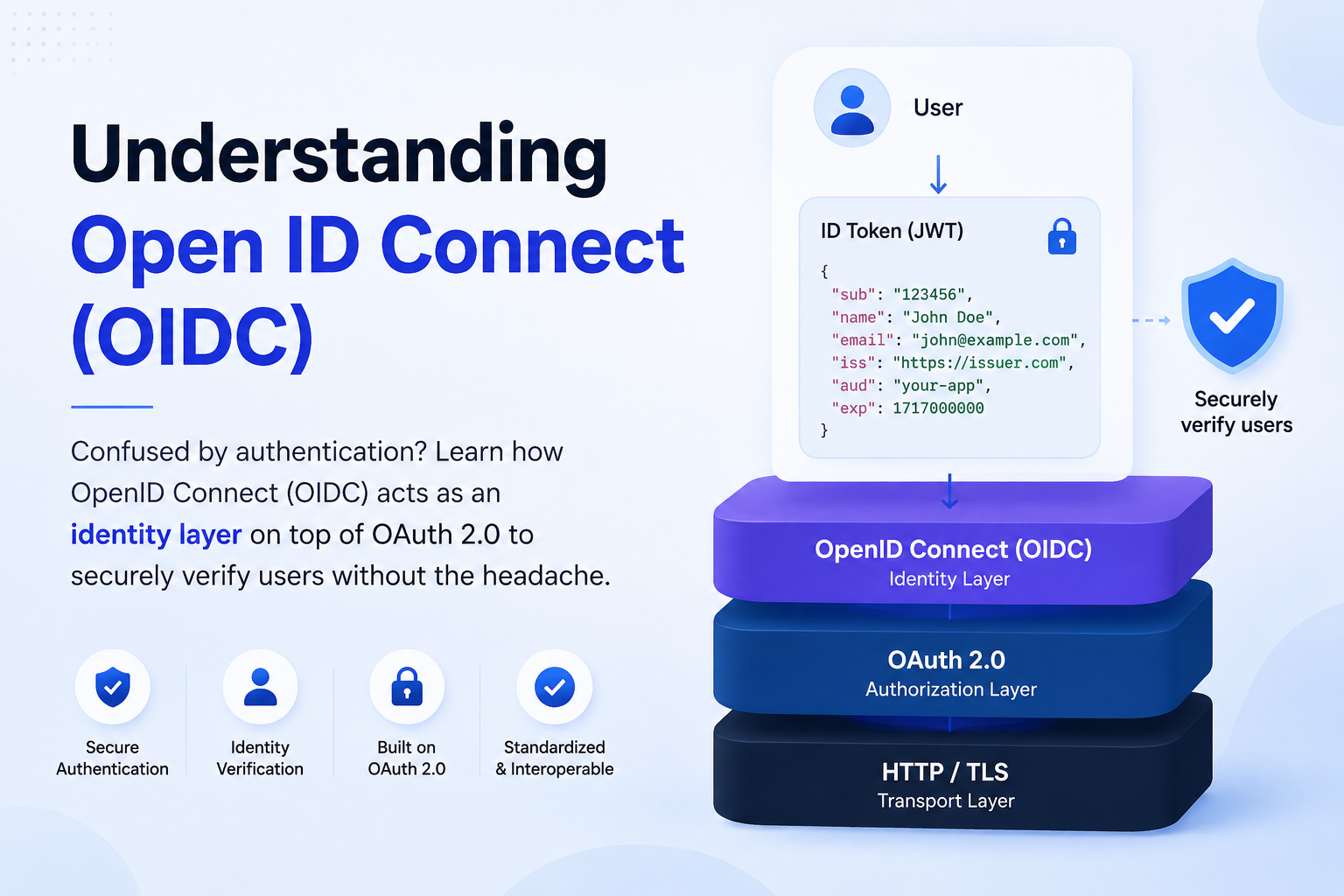
Confused by authentication? Learn how OpenID Connect (OIDC) acts as an identity layer on top of OAuth 2.0 to securely verify users without the headache.
Have you ever wondered what actually happens behind the scenes when you click that "Sign in with Google" button?
It’s a lot like checking into a massive music festival. Instead of carrying your passport, credit cards, and ticket to every single stage, you show your ID once at the front gate to get a secure, tamper-proof wristband. From that point on, every stage manager instantly knows exactly who you are just by looking at it.
While developers often mistake OAuth 2.0 as the tool for this job, the real magic happens because of OpenID Connect (OIDC).
In this guide, we are going to break down how OIDC acts as the web’s ultimate identity layer and why it's the gold standard for secure authentication.
Understanding OAuth Flow
1. What is OAuth?
OAuth (Open Authorization) is a security standard that allows an application to access your data or accounts on another service without needing your password.
OAuth enables secure, limited access to user data across different applications without exposing user passwords and access features like "Sign in with Google" or "Allow App to Access Contacts" .
"OAuth acts like a digital valet key or a secure electronic hotel keycard. It provides a way to delegate specific permissions to apps you trust."
2. Why do we need OAuth?
We need OAuth because sharing passwords with third-party applications creates a massive security risk.
Exposed Master Passwords : Users must type their primary passwords directly into third-party apps, exposing them to untrusted developers.
Widespread Credential Theft : If a poorly secured third-party app gets hacked, cybercriminals steal actual user passwords to breach other websites.
Unlimited Account Privileges : Connected apps gain total control over the account, allowing them to read private messages, delete data, or make unauthorized purchases.
Endless Data Access : Shared passwords give third-party apps permanent access to user data with no built-in expiration dates.
3. Difference between OAuth and OAuth2.0
OAuth
Cryptographic Nightmare (Signature Complexity)
Poor Mobile and Desktop Support
No Short-Lived Tokens (High Security Risk)
Monolithic Server Architecture
Lack of Clear Separation of Duties (Roles)
OAuth2.0
Shifted Security to HTTPS (Fixed the Cryptographic Nightmare)
Introduced Multiple Grant Types (Fixed Mobile & Desktop Support)
Created Access & Refresh Tokens (Fixed the Lifespan Risk)
Split Authorization from Resources (Fixed the Monolithic Architecture)
Formalized Scopes and Clients (Fixed the Unclear Roles)
Understanding Open ID Connect (OIDC)
1. OIDC Layers (Conceptual Stack)
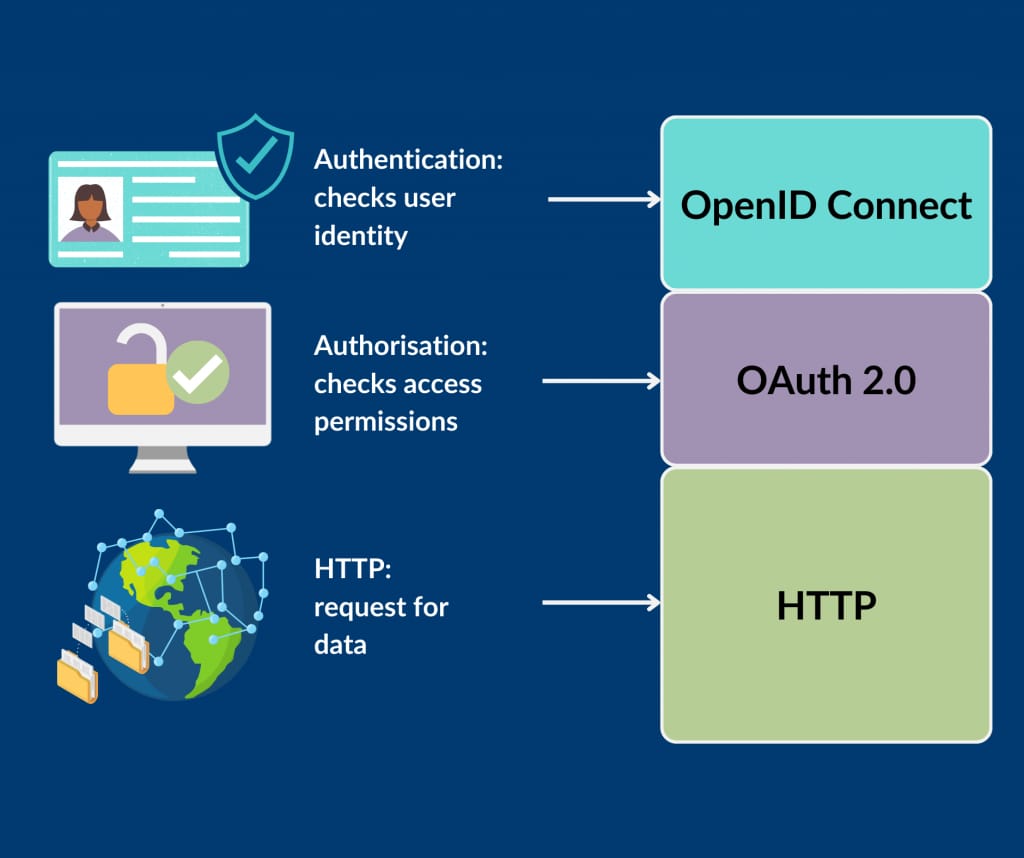
Application (Your App)
↑
OIDC (Identity Layer)
↑
OAuth 2.0 (Authorization)
↑
HTTP / TLS (Transport Security)
2. What is Open ID Connect
OpenID Connect (OIDC) is an identity verification layer built directly on top of the OAuth 2.0 framework that allows third-party applications to authenticate who a user is.
Core Components
User : User trying to sign in the application having OAuth2.0 which is registered on Authorization Server.
Client : Application registered on Authorization Server (frontend/backend)
"We will discuss it later how OIDC client can be frontend or backend."
- Authorization Server : Application which handles sign in and issue tokens (basically provide Authentication flow) , e.g Google cloud, clerk, auth0, ...
You can even see my own OIDC Provider (ProtoAuth)
Endpoints (Discovery-Based)
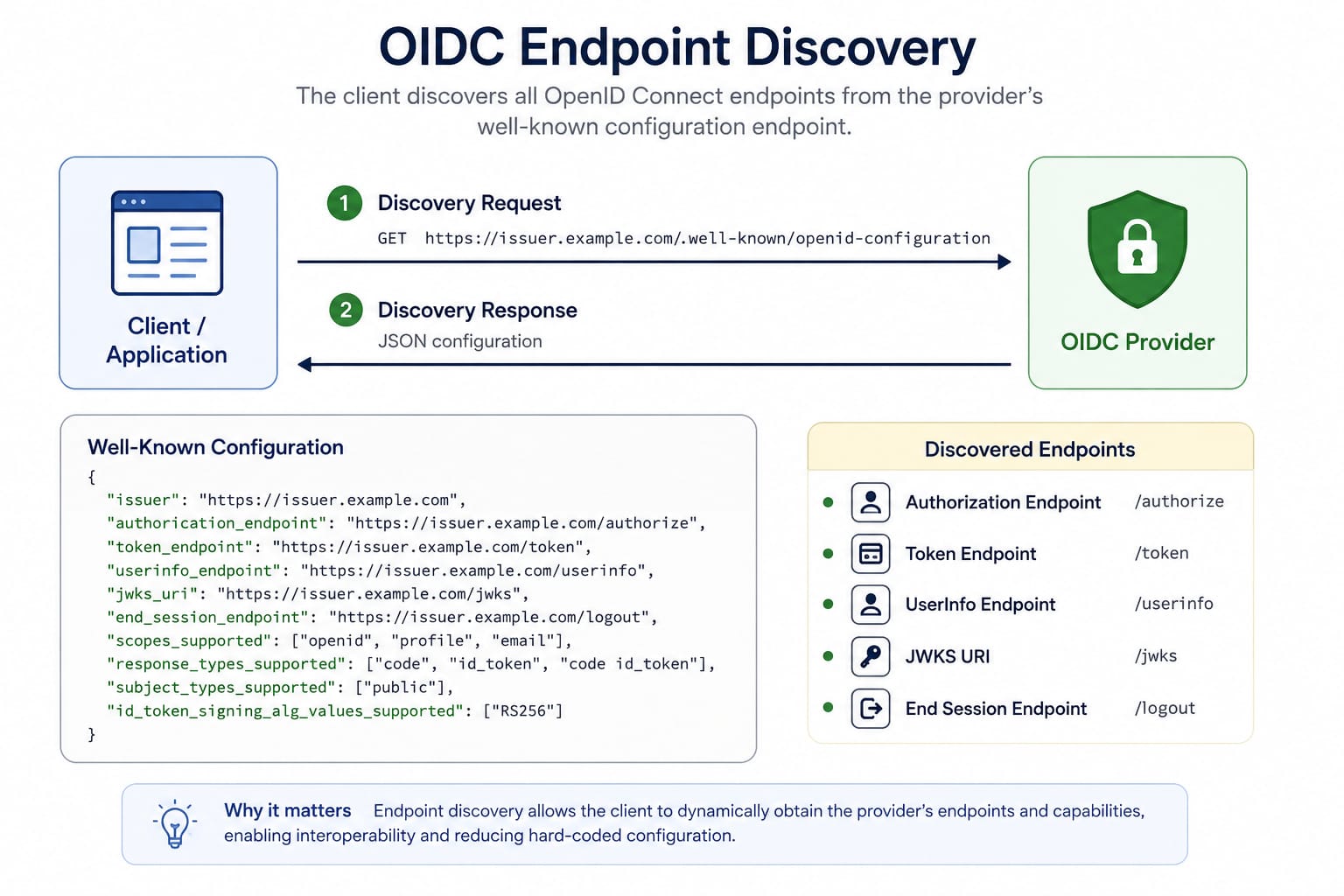
OIDC standardizes endpoints via discovery route on /.well-known/openid-configuration
Core Architecture Fields
issuer : The absolute URL identifying the authorization server. It must exactly match the
issclaim inside generated tokens.authorization_endpoint : The sign in page URL where users enter credentials and consent to share data.
token_endpoint : The backend server URL where applications exchange authorization codes for access and refresh tokens.
userinfo_endpoint : A protected API that returns profile information about the authenticated user.
jwks_uri : The location of the public keys needed to verify the cryptographic signatures of incoming JSON Web Tokens (JWTs).
revocation_endpoint : The route used to immediately invalidate active tokens, usually when a user sign out.
Supported Capabilities Arrays
scopes_supported : The list of all data permissions the server allows an application to request.
response_types_supported : The authorized workflows (like Authorization Code or Implicit flows) available for obtaining tokens.
subject_types_supported : The method used to generate user identifiers (e.g.,
publicuses the same ID across all client apps).id_token_signing_alg_values_supported : The cryptographic algorithms supported for signing the identity token (
RS256,HS256, etc.).token_endpoint_auth_methods_supported : The allowed client authentication schemes when talking to the token endpoint, such as basic auth or post parameters.
claims_supported : The individual pieces of user data (like name or email) that can be embedded directly inside the identity token payload.
{
  "issuer": "https://identity.example.com",
  "authorization_endpoint": "https://example.com",
  "token_endpoint": "https://example.com",
  "userinfo_endpoint": "https://example.com",
  "revocation_endpoint": "https://example.com",
  "jwks_uri": "https://example.com",
  "scopes_supported": [
    "openid",
    "profile",
    "email",
    "offline_access"
  ],
  "response_types_supported": [
    "code",
    "token",
    "id_token"
  ],
  "subject_types_supported": [
    "public"
  ],
  "id_token_signing_alg_values_supported": [
    "RS256"
  ],
  "token_endpoint_auth_methods_supported": [
    "client_secret_basic",
    "client_secret_post"
  ],
  "claims_supported": [
    "iss",
    "sub",
    "aud",
    "exp",
    "iat",
    "auth_time",
    "acr",
    "amr",
    "name",
    "given_name",
    "family_name",
    "email"
  ]
}
The issuer, authorization_endpoint, token_endpoint, userinfo_endpoint, jwks_uri endpoints are necessary for any Authorization Server.
ID Token (JWT Structure)
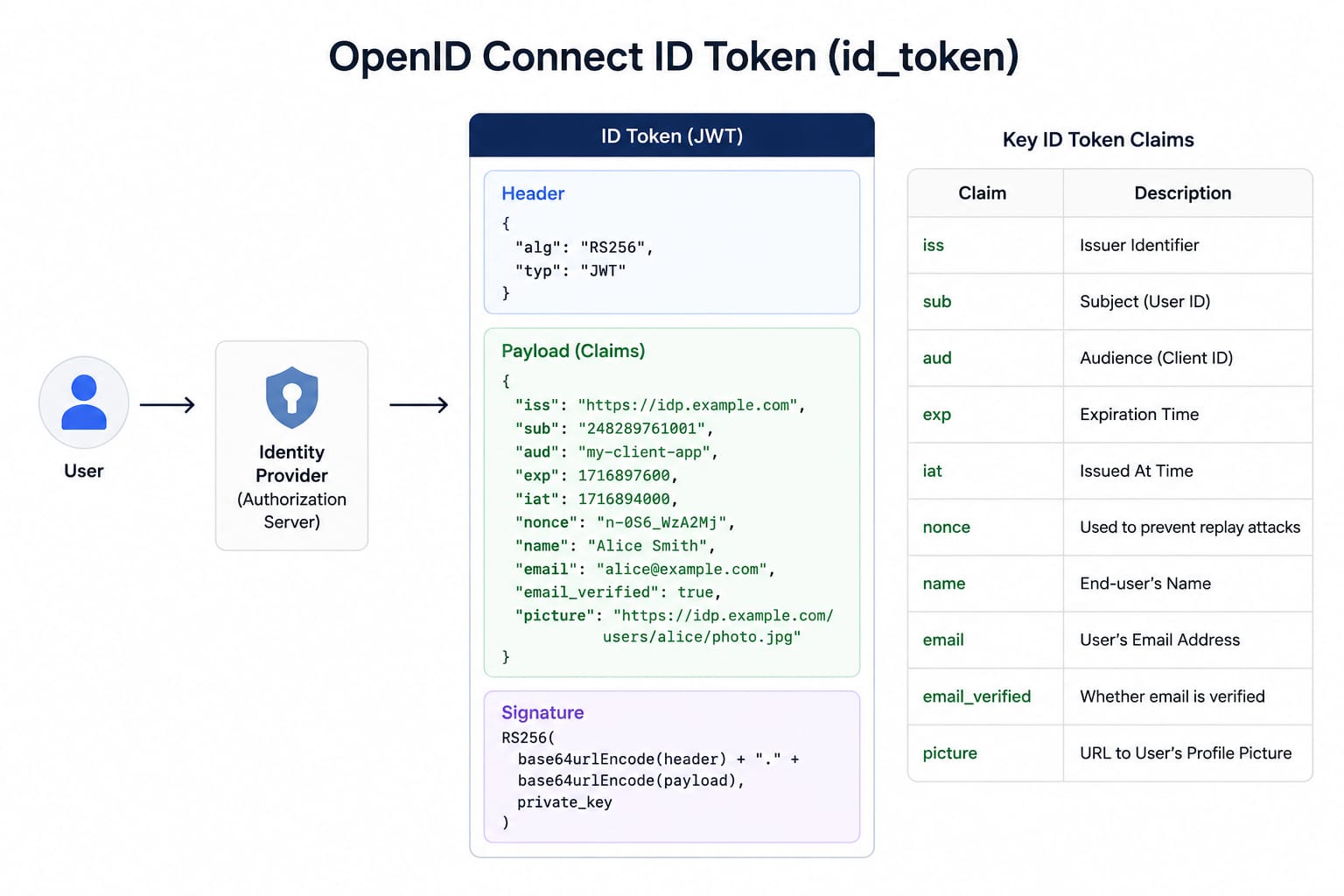
Unlike an OAuth Access Token (which is usually unreadable string to the app), an OIDC ID Token is always a JSON Web Token (JWT). It is split into three parts separated by dots (Header.Payload.Signature) and Base64Url encoded.
When your app decodes the central payload of an ID Token, it sees a standardized set of key-value pairs called Claims. These are divided into core security claims and user profile claims.
{
    "iss": "https://google.com",
    "sub": "10928374651029384756",
    "aud": "my-client-app-id-123",
    "exp": 1780704000,
    "iat": 1780700400,
    "auth_time": 1780700350,
    "acr": "urn:mace:incommon:iap:silver",

    "name": "Alex Smith",
    "email": "alex.smith@example.com",
    "email_verified": true
}
iss(Issuer): The unique URL of the Identity Provider (IdP) that generated the token.sub(Subject): A permanent, unique, non-recyclable identifier for the user. Never use emails as unique keys; always usesub.aud(Audience): The Client ID of your specific application. Your app must reject the token if this doesn't match your ID.exp/iat: The expiration time and issued-at time (Unix timestamps).auth_time: The exact time the user physically typed their password. Useful if your app requires re-authentication for sensitive actions (like changing billing info).acr(Authentication Context Class Reference): States how the user logged in (e.g., if they used Multi-Factor Authentication/MFA).
3. Difference b/w OIDC and OAuth2.0
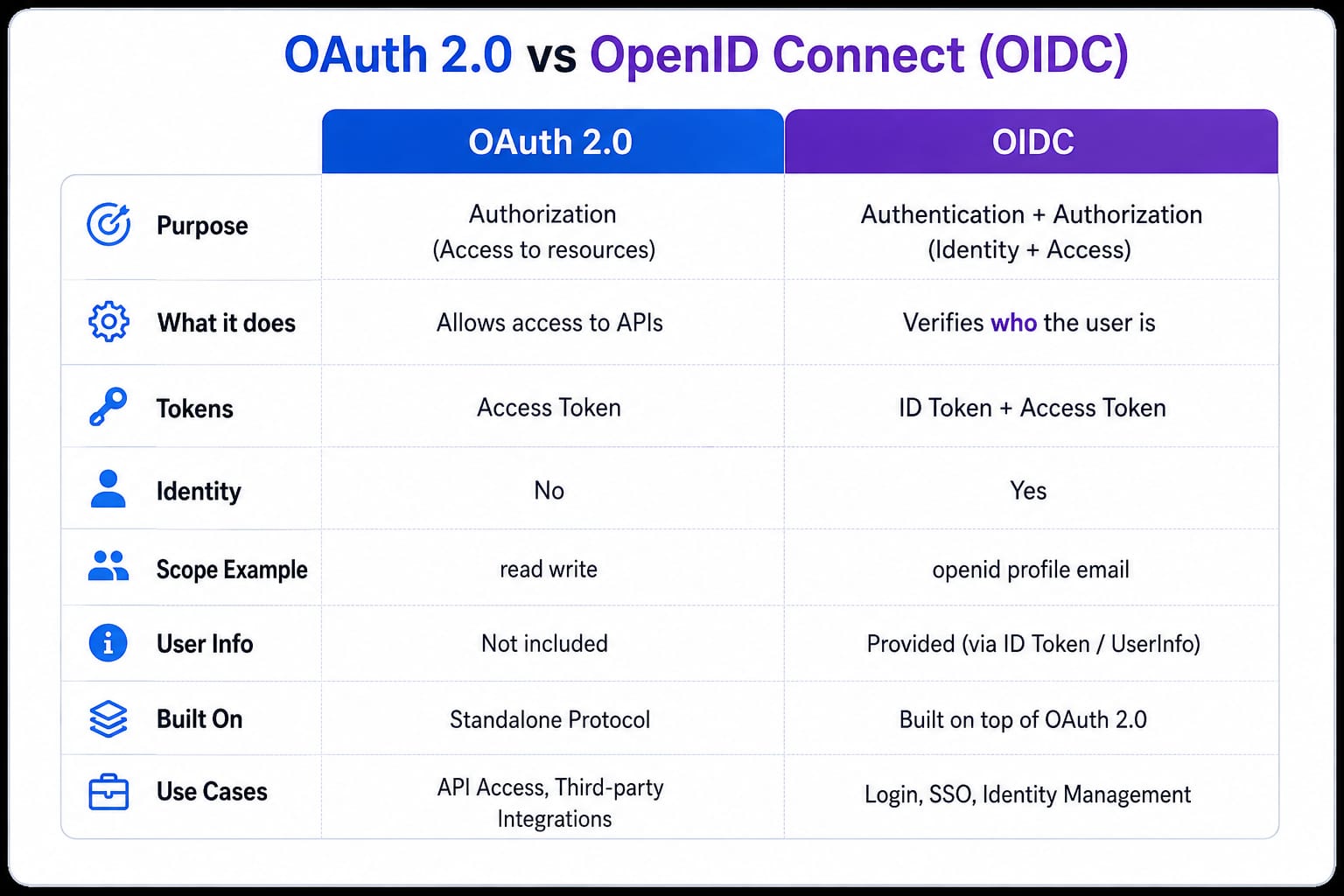
OAuth2.0
Authorization : Grants a third-party application limited access to your resources without exposing your credentials.
Access Token
OAuth 2.0 (Hotel Keycard) : It grants you access to the room, but it does not know your name or identity.
OIDC
Authentication : Verifies the identity of the end-user and passes basic profile information (like name, email, and picture) to the application.
Built on top of OAuth 2.0 (OIDC = OAuth2.0 + Identity layer)
ID Token(JWT) + Access Token
OIDC (Passport) : It contains your photo, name, and verified details to prove exactly who you are.
4. Core OIDC Protocol Flow (Important)
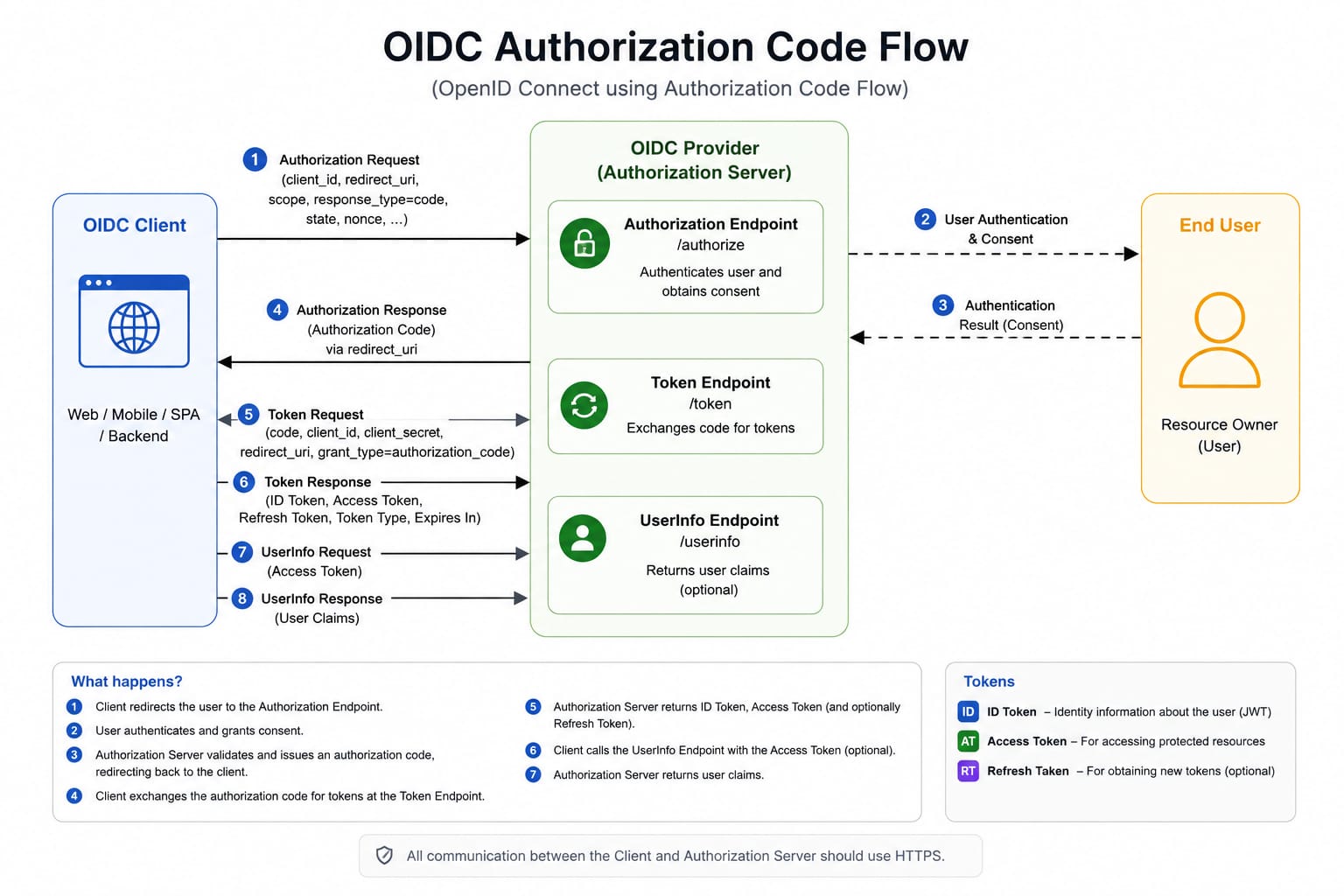
Discovery
Client fetches config through standard discovery endpoint
GET /.well-known/openid-configuration
Authorization Request
Redirect user to the authorization_endpoint with necessary query payload such as client_id, redirect_uri, scope
GET https://example.com/o/authenticate?
  response_type=code&
  client_id=client_123&
  redirect_uri=https%3A%2F%2Fapp.example.com%2Fcallback&
  scope=openid%20profile%20email&
  state=af0ifjsldkj&
  nonce=n-0S6_WzA2Mj&
  code_challenge=CODE_CHALLENGE&
  code_challenge_method=S256
response_type=code: Tells the authorization server to return a temporary Authorization Code rather than tokens directly.client_id=client_123: Allows the authorization server to identify which app is requesting access and apply its specific security settings.redirect_uri=https://example.com: Delivers the Authorization Code safely back to your app. It must match the server's pre-registered list to prevent hackers from stealing the code.scope=openid profile email:openidtriggers the OpenID Connect identity flow.profileandemailrequest access to the user's basic profile details and email address.
Security & Anti-Tampering Parameters
state=af0ifjsldkj: Protects against Cross-Site Request Forgery (CSRF) attacks. The client verifies that the returned state matches the sent state.nonce=n-0S6_WzA2Mj: Prevents replay attacks. The authorization server embeds this exact string inside the final ID token, allowing the client to verify the token was generated specifically for this request.
PKCE (Proof Key for Code Exchange) Parameters
code_challenge=CODE_CHALLENGE: Prevents malicious apps from intercepting and using the Authorization Code. The server holds this challenge and compares it against the raw secret when your app exchanges the code for tokens.code_challenge_method=S256: Tells the server that the challenge was generated using SHA-256 hashing, which is the secure, industry-standard method.
User Authentication
User signs in at provider. Now , provider may show signin, signup, consent page.
Authorization Code Returned
redirect_uri?code=abc123
Token Exchange
POST https://example.com/o/token?
    code=abc123&
    client_id=client_id_123&
    client_secret=client_secret_123&
    redirect_uri=https%3A%2F%2Fapp.example.com%2Fcallback&
    grant_type=authorization_code&
    code_verifier=my_secret_random_string_12345
Endpoint & Protocol Fields
POST https://example.com: Targets the authorization server's secure token endpoint via a back-channel network connection, keeping sensitive tokens out of browser history.grant_type=authorization_code: Instructs the server to process this request using the Authorization Code grant flow, signaling that an authorization code is being traded for tokens.
Grant Types in OIDC :
authorization_codeimplicit(deprecated)client_credentialspassword(deprecated)device_code
Verification & Matching Fields
code=abc123: Supplies the temporary, single-use ticket received from the browser redirection step, proving the user successfully authenticated.redirect_uri=https://example.com: Acts as a security checkpoint by ensuring this exact string matches the redirect URI provided during the initial authorization request.
Application Authentication
client_id=client_id_123: Identifies the specific application making the request against the server's registration database.client_secret=client_secret_123: Authenticates the backend application server using a private password, preventing malicious actors from impersonating the application.
PKCE Security Verification
code_verifier=my_secret_random_string_12345: Provides the raw, unhashed secret string that the server hashes and checks against the originalcode_challengeto block authorization code interception.
Response
{
  id_token,
  access_token,
  refresh_token
}
ID Token Validation
Client must verify signature (using jwks_uri)
issmatches provideraudmatches client_idexpnot expired
User Session Created
Extract user from
id_tokenStore session (cookie / JWT / state)
UserInfo Endpoint
Instead of decoding ID token fully
GET /userinfo
Authorization: Bearer access_token
5. OIDC Flows
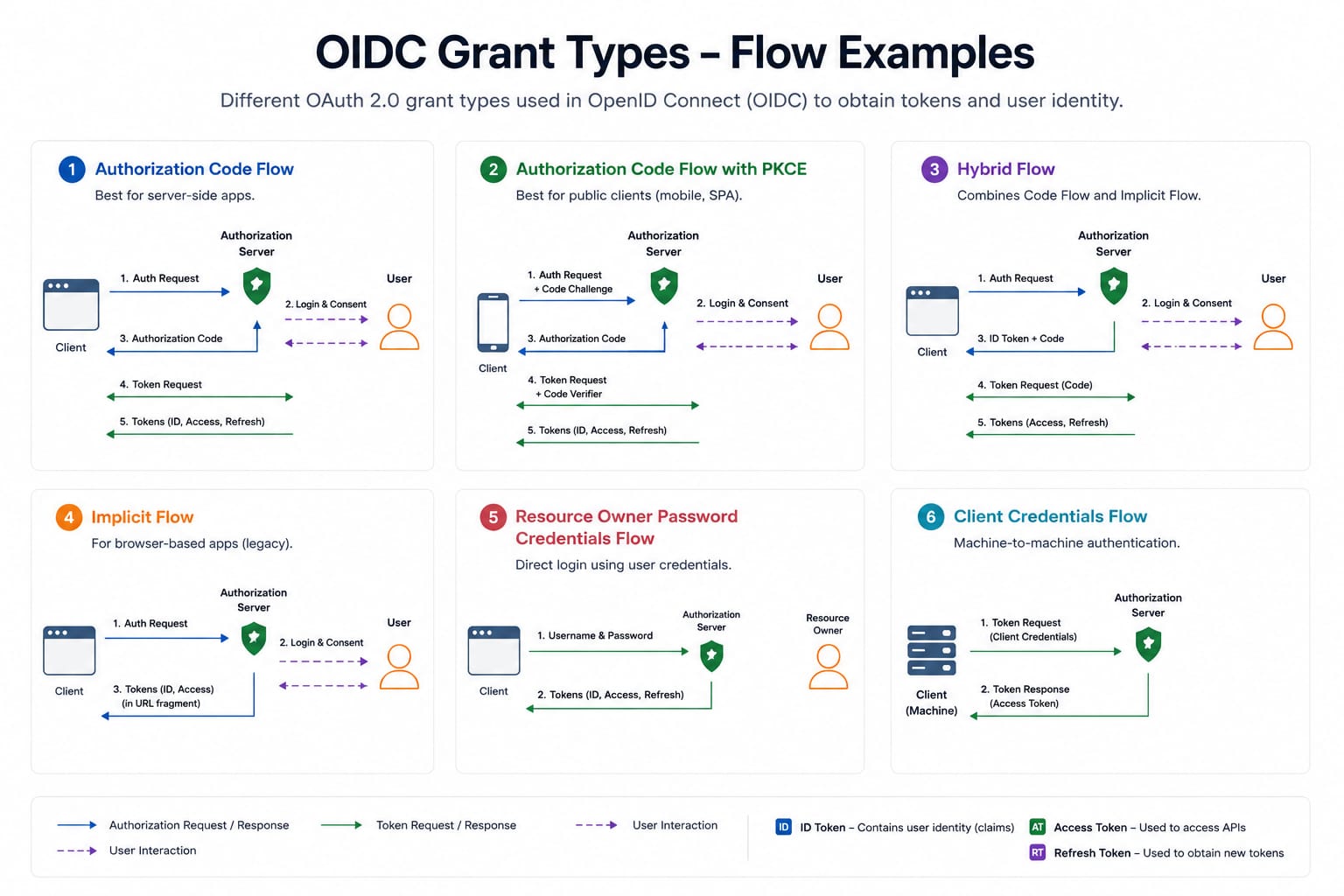
Authorization Code Flow (Gold Standard)
Authorization Code + PKCE (Modern Standard)
Hybrid Flow
Implicit Flow (Deprecated)
I hope you remember that i told to explain a point later, on how provider client can be backend or frontend. This is exactly where you are gonna understand how.
1.Authorization Code Flow
- Core Idea
Frontend gets a code, backend exchanges it for tokens.
- Flow
Step 1 : Redirect
response_type=code
GET https://example.com/o/authenticate?
  response_type=code&
  client_id=client_123&
  redirect_uri=https%3A%2F%2Fapp.example.com%2Fcallback&
  scope=openid%20profile%20email&
  state=af0ifjsldkj&
  nonce=n-0S6_WzA2Mj
Step 2 : User Authenticates (handles by OIDC provider)
Step 3: Code Returned
redirect_uri?code=abc123
Step 4: Backend Exchange
POST https://example.com/o/token?
    code=abc123&
    client_id=client_id_123&
    client_secret=client_secret_123&
    redirect_uri=https%3A%2F%2Fapp.example.com%2Fcallback&
    grant_type=authorization_code
No PKCE → vulnerable to interception
Response
{
  id_token,
  access_token,
  refresh_token
}
2.Authorization Code + PKCE
- Why PKCE Exists ?
Originally, public clients (SPA/mobile) had no client_secret.
So, to ensure safety against intercepted code reuse PKCE modal was introduced.
You dont need client_secret if your application is a public client(SPA/mobile), but you do need it if your application is a confidential client (a traditional web application with a secure backend server).
- Flow
- Generate
code_verifier = random string
code_challenge = hash(code_verifier)
- Send Challenge
response_type=code
GET https://example.com/o/authenticate?
  response_type=code&
  client_id=client_123&
  redirect_uri=https%3A%2F%2Fapp.example.com%2Fcallback&
  scope=openid%20profile%20email&
  state=af0ifjsldkj&
  nonce=n-0S6_WzA2Mj&
  code_challenge=CODE_CHALLENGE&
  code_challenge_method=S256
- Exchange
POST https://example.com/o/token?
    code=abc123&
    client_id=client_id_123&
    client_secret=client_secret_123&
    redirect_uri=https%3A%2F%2Fapp.example.com%2Fcallback&
    grant_type=authorization_code&
    code_verifier=my_secret_random_string_12345
Internally, Authorization server checks
hash(code_verifier) == code_challenge
If it found the mismatch then it rejects the incoming request.
3.Hybrid Flow
- Core Idea
Immediate token & authorization code
- Flow
- /authorize?
response_type=code id_token
GET https://example.com/o/authenticate?
  response_type=code%20id_token
  client_id=client_123&
  redirect_uri=https%3A%2F%2Fapp.example.com%2Fcallback&
  scope=openid%20profile%20email&
  state=af0ifjsldkj&
  nonce=n-0S6_WzA2Mj
- /token?
POST https://example.com/o/token?
    code=abc123&
    client_id=client_id_123&
    client_secret=client_secret_123&
    redirect_uri=https%3A%2F%2Fapp.example.com%2Fcallback&
    grant_type=authorization_code
- Why It Exists ?
Reduce latency (early identity), frontend has to validate id_token.
Still allow backend validation, code exchange happen on backend (secure).
4.Implicit Flow
- Core Idea
Tokens returned directly in URL
No client_secret is needed since tokens are directly being served from authorization server.
- Flow
- /authorize?
response_type=id_token token
GET https://authorization-server.com
  ?response_type=token
  &client_id=your_public_client_id
  &redirect_uri=https://your-app.com
  &scope=read_profile
  &state=random_anti_csrf_string
Response
//302 redirect
https://your-app.com
  #id_token=eyJhbGciOiJSUzI1NiIs...
  &access_token=eyJhbGciOiJSUzI1NiIs...
  &token_type=Bearer
  &expires_in=3600
  &state=xyz123
Comparison :
| Flow | What Changes |
|---|---|
| Authorization Code | code → backend → tokens |
| Code + PKCE | code(pkce secured) → backend → tokens(pkce verified) (Same + extra security) |
| Implicit | tokens → frontend (tokens directly in browser) |
| Hybrid | Code → frontend → backend → tokens (mix of both) |
You can see how grant_type decides whether the client will be frontend or backend and hence changes redirect_uri according to them.
Comments
Join the discussionNo comments yet. Be the first to comment.